Faint laser marks on anodized aluminum are rarely caused by one setting alone. Surface dye, oxide thickness, laser wavelength, focus, and cleaning residue can all change the final contrast. The question many technicians ask is, “why is laser marking not showing on anodized aluminum?” The answer often begins beneath the visible surface. Anodizing creates a controlled oxide layer, while laser marking must remove or alter that layer without damaging the base aluminum.
Industry evidence supports a careful, measurable approach. The Aluminum Association’s 2024 Aluminum Statistical Review highlights aluminum’s extensive use in transportation, electronics, and industrial products. These applications increasingly require durable identification and traceability. MarketsandMarkets’ Laser Marking Market analysis also identifies automotive, electronics, and manufacturing as major demand areas for permanent marking systems. However, market reports cannot replace a controlled test on the actual anodized batch. Color, sealing treatment, and coating thickness vary considerably.
Look closely at the mark. A pale gray line may indicate insufficient energy, incorrect focus, or excessive scan speed. A brown edge can suggest overheating. A completely invisible mark may result from marking the wrong surface, especially after protective coating or cleaning. Small details matter. Test a 10-by-10 millimeter grid, changing one variable at a time. Check focal height with a gauge, not only by eye. Clean the sample with a suitable lint-free wipe, then inspect it under angled light. This method is slower, but more reliable. I would not claim every faint mark can be repaired; some anodized layers are already inconsistent. This guide explains practical diagnosis, cautious parameter adjustment, and verification methods based on production experience, manufacturer guidance, and recognized laser-safety practice under IEC 60825-1.
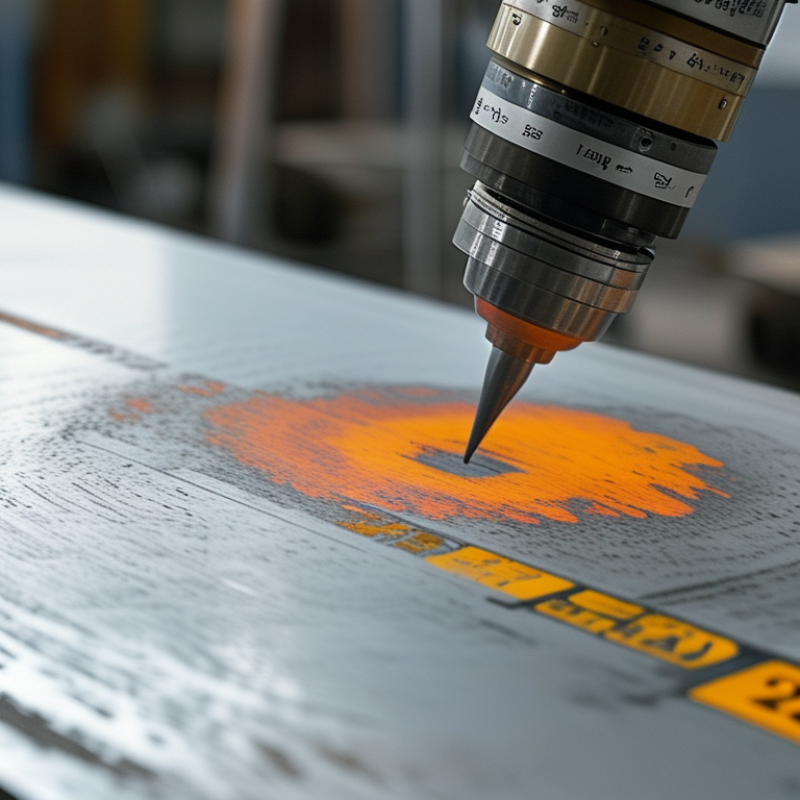
Faint laser marks usually indicate inconsistent energy reaching the anodized surface. The coating may vary in thickness across one sheet. Darker and lighter areas can appear within the same design.
Check the material before changing machine settings. Wipe a small area with isopropyl alcohol, then inspect it under angled light. Oil, polishing residue, or dust can scatter the beam. A dirty lens can also reduce energy and create soft, pale edges. Keep it simple. Measure the coating when possible, because visual inspection can mislead you.
Focus height deserves careful attention. A slight gap can make thin lines look gray instead of clean and bright. Excessive speed, low power, or an unsuitable pulse frequency may produce the same symptom. Run a small test grid using identical artwork. Change one setting at a time. Record the result beside each sample.
Material color also affects contrast. Some anodized finishes require more energy than expected, while excessive energy may damage the surface. My early mistake was increasing power immediately. The mark became wider, not darker. That result showed the real issue was focus, not energy. Check alignment, air movement, and surface flatness before adjusting aggressively. A warped plate can place different areas outside the focal point.
2026 How to Fix Faint Laser Marks on Anodized Aluminum
Inspect and Prepare the Anodized Aluminum Surface
Faint laser marks often begin with surface problems, not machine settings. Inspect the aluminum under bright, angled light before changing any laser parameters. Look for fingerprints, oil haze, polishing lines, scratches, and uneven anodizing. A clean surface should appear consistent from edge to edge. Record the part’s color, coating thickness, and previous cleaning method when possible. These details help separate a marking issue from a coating issue.
Wear clean, powder-free gloves during handling. Wipe the surface with a lint-free cloth and a suitable residue-free cleaner. Test the cleaner on a hidden area first. Some coatings react badly. Let the aluminum dry completely before inspection. Do not polish the target area, because polishing can thin or alter the anodized layer. A magnifying glass can reveal fine residue around the intended mark. I have sometimes mistaken this residue for weak laser contrast, which led to unnecessary machine adjustments.
Tips: Use a soft inspection light, not direct glare. Photograph the surface before preparation. Keep one untreated sample for comparison. If the finish remains patchy after cleaning, pause the marking process and check coating uniformity. A second inspection is worthwhile. Small surface differences can create surprisingly large changes in mark visibility.
Anodized aluminum coating thickness is commonly classified at nominal minimum levels of 5, 10, 15, 20, and 25 micrometres. Before correcting a faint laser mark, measure the coating, inspect the surface for oil, dust, scratches, and uneven color, then clean it with a lint-free cloth and a compatible solvent such as isopropyl alcohol. Avoid aggressive abrasion because it can remove or thin the anodized layer and create inconsistent marking contrast.
Use a coating-thickness gauge where possible, verify cleanliness on a small area, and run a controlled test mark before changing laser power, speed, frequency, or focus.
Faint laser marks on anodized aluminum usually indicate insufficient energy at the surface. Start by checking focus with a fine test grid, not by increasing power immediately. A defocused beam spreads heat and produces pale, uneven lettering. ISO 7599:2018 identifies common anodic coating thickness classes from 5 to 25 micrometres, so thicker coatings may require different settings.
Use a controlled matrix for power and speed. Keep focus fixed, then raise power in 5% steps while reducing speed by 10% steps. For a 20–30 W pulsed fiber system, a practical starting range is 20–40% power, 500–1,200 mm/s, and one pass. These figures are not universal. Pulse width, spot size, coating color, and surface temperature change the result. Short test lines reveal more than a full logo. Watch for a clean, light contrast rather than a brown edge.
If one pass remains faint, test two slower passes before using extreme power. Excess energy can melt residue, widen characters, or create a cloudy halo. Clean the panel with lint-free material and approved solvent before testing. I have found that operators often blame power when the real issue is focus or inconsistent coating thickness. That assumption deserves checking. Record each result, including ambient temperature and material batch. IEC 60825-1:2014 also requires controlled laser operation, enclosure assessment, and suitable protective measures during these tests.
| Observed Mark | Likely Cause | Power Adjustment | Speed Adjustment | Focus Position | Passes | Recommended Test and Expected Result |
|---|---|---|---|---|---|---|
| Uniform but very faint mark | Insufficient energy delivered to the anodized surface | Increase by 5–10% per test step | Reduce by 10–20% if power is already near the machine limit | Return to the calibrated focal plane | 1–2 | Run a small 5 × 5 test grid. The mark should become visibly darker without exposing excessive bare aluminum. |
| Faint mark with sharp edges | Power is low, but beam alignment and focus are acceptable | Increase power gradually from the current setting | Keep the current speed for the first comparison | Keep focus unchanged | 1 | Changing one variable at a time helps confirm that power, rather than focus, is limiting contrast. |
| Faint and slightly blurred mark | Workpiece is outside the effective focal depth | Keep power unchanged initially | Keep speed unchanged initially | Refocus in small increments, typically 0.1–0.3 mm | 1 | The best focus produces the narrowest, most consistent line before additional power is applied. |
| Mark is visible only after repeated passes | Single-pass energy is too low or the scan speed is too high | Increase 5–10% or use the current power for comparison | Reduce by 10–25% | Use the calibrated focal plane | 2–3 | Compare one slower pass with two normal-speed passes. Select the setting that gives uniform contrast with minimal cycle time. |
| Uneven darkness across the same design | Uneven surface, incorrect height, lens contamination, or inconsistent hatch overlap | Do not increase power first | Keep speed constant during diagnosis | Check Z-height and focal plane across the work area | 1 | Clean the optics according to the equipment procedure and verify that the part is flat and securely supported before changing laser energy. |
| Dark center with pale edges | Spot size or focus changes across the field; possible field-lens or height issue | Return to the baseline power | Return to the baseline speed | Check focus at the center and edges of the work area | 1 | If the variation follows position rather than the artwork, correct setup, flatness, or field calibration before optimizing marking parameters. |
| Mark becomes brown, smoky, or over-processed | Excessive heat input from high power, slow speed, or too many passes | Reduce by 5–15% | Increase by 10–25% | Keep the correct focal plane | Return to 1 | Use the lowest energy that produces the required contrast. Air extraction and suitable ventilation should be used for process fumes. |
| Fine text is faint while large areas look acceptable | Small features receive less effective overlap or are affected by scan and hatch settings | Increase slightly only if edges remain clean | Reduce by 5–15% for a controlled test | Verify exact focus at the part surface | 1–2 | Test the smallest text and narrowest lines separately. Avoid excessive power, which can close gaps and reduce legibility. |
| Contrast changes between different anodized parts | Coating color, thickness, surface finish, and alloy vary between batches | Create a new material-specific test grid | Create a new material-specific test grid | Confirm focus for every part thickness | 1–2 | Record the successful power, speed, focus offset, and pass count for each coating and finish instead of using one universal preset. |
Faint laser marks on anodized aluminum often result from unsuitable marking parameters, not a damaged laser source. Test every adjustment on a matching sample before touching the finished part. The sample should share the same alloy, anodizing color, surface texture, and batch when possible. Small differences can change the final contrast.
Begin with the manufacturer’s safe operating range for power, speed, frequency, and focal position. Change one setting at a time. I usually create a small test grid with short labels and measured spacing. Keep the lens clean and confirm the workpiece sits flat at the correct focus. A slightly defocused beam may produce a wider, weaker mark. Excessive speed can also leave only a pale surface change.
Inspect the sample under the same lighting used for quality checks. Wipe away residue with a suitable, non-abrasive cleaner before judging contrast. Record each setting, including pass count and air assistance. My first trial sometimes looks acceptable under the machine light but fades under neutral room lighting. That mistake is useful, though it can waste material. If the mark remains faint, test a slower speed or a carefully increased power level. Avoid large jumps. Heat buildup may discolor the coating or create uneven edges. Keep the best sample with the job record, and verify the result again after the equipment reaches normal operating temperature.
Before applying the final laser mark, clean the anodized aluminum with lint-free wipes and approved solvent. Even a fingerprint can create a pale edge or uneven contrast. Confirm focus on the actual part, not only on a calibration coupon. Surface thickness and anodizing shade may vary between batches.
Use a small test grid to adjust power, speed, frequency, and hatch spacing. The final pass should sharpen the mark without exposing excessive bright metal. Keep the part firmly clamped. Movement of less than a millimeter can damage fine characters. After marking, inspect the surface under consistent white lighting and record the machine settings, batch number, and operator. The International Federation of Robotics reported 541,302 industrial robot installations in 2023, showing the scale of automated production. Yet automation does not replace visual judgment.
Verify every critical mark for legibility, position, contrast, and damage. For data codes, grade readability with ISO/IEC 15415 or ISO/IEC 15416, depending on the code type. These standards use quality grades from 0 to 4, helping teams compare results objectively. A handheld verifier is more reliable than eyesight alone. Check samples at the beginning, middle, and end of a production run. I still find occasional weak corners after a successful setup. That is why one perfect sample is not enough. Review failed marks, adjust cautiously, and preserve the evidence.
Faint marks usually mean inconsistent energy reaches the coated surface. Coating thickness, dust, speed, power, and focus can all contribute.
Wipe a small area with isopropyl alcohol. Inspect it under angled light. Look for oil, dust, polishing residue, or uneven coating.
Yes. A dirty lens can reduce energy and soften line edges. Clean the lens using the equipment’s approved procedure.
Even a small focus gap can make thin lines appear gray. Confirm focus on the actual part, not only on a separate coupon.
Use matching material and identical artwork. Test power, speed, frequency, focal position, pass count, and hatch spacing.
No. Test one setting at a time. Higher power may widen the mark or damage the coating.
Alloy, color, texture, batch, and coating thickness can change the contrast. A mismatched sample may give misleading results.
Use consistent white lighting. Check legibility, position, contrast, and surface damage. Inspect samples at the run’s beginning, middle, and end.
Not really. Weak corners or shifting parts may appear later. I once trusted one good sample and missed a focus problem.
Record power, speed, frequency, focus, pass count, batch number, and operator. Keep the best sample with the job record.
Faint laser marks on anodized aluminum usually result from an incorrect balance of laser power, marking speed, focus, or pass count. Before changing settings, inspect the surface for oil, dust, residue, uneven anodizing, or protective coatings, then clean and dry it carefully. A poorly focused beam or inconsistent surface preparation can prevent the laser from creating a clear contrast. If you are asking, “why is laser marking not showing on anodized aluminum,” the answer may also involve insufficient energy reaching the anodized layer or settings that are too aggressive and remove contrast instead of producing a clean mark.
Use a matching sample to test small adjustments in power, speed, focus position, and repeated passes. Compare each result for brightness, sharpness, uniformity, and surface condition. Once the most effective parameters are identified, apply them to the final part with stable positioning and consistent focus. Finally, verify the mark under suitable lighting and inspect its legibility, edges, coverage, and durability before approving the finished result.
